
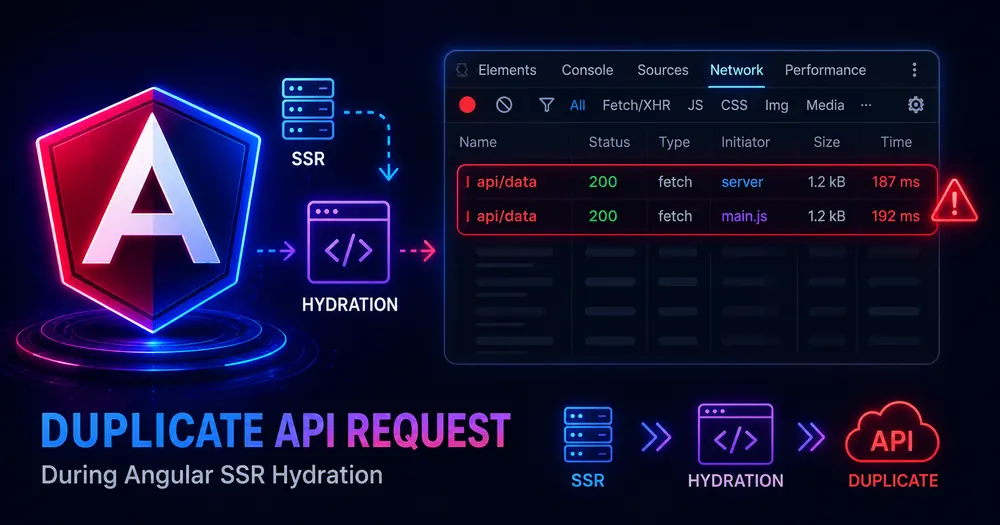
Open the Network tab on your Angular SSR app and watch the first load. There’s your /api/products request. And there it is again — the same call, fired a second time the moment the page hydrates. Once on the server, once in the browser. Your API just did double the work for a single page view.
This is the most common surprise after switching on SSR, and it isn’t a bug in your code. Angular ships a built-in fix — the HttpClient transfer cache — and most of the time it just works: the server serializes its responses into the HTML, and the client reuses them instead of re-fetching. When you still see duplicate API calls, it’s because your requests fall into one of a handful of cases the cache skips by default.
Here’s why it happens, and how to shut the duplicates down for good.
Table of Contents
- Why Your API Fires Twice
- How the HttpClient Transfer Cache Works
- Quick Checklist: Why Dedupe Fails
- Fix 1 — Confirm Hydration Is Actually Enabled
- Fix 2 — Cache POST Requests (GraphQL)
- Fix 3 — Handle Authenticated Requests
- Fix 4 — Map Mismatched Server and Client Origins
- When Should You Disable the Transfer Cache?
- How to Verify the Duplicates Are Gone
- Conclusion
- FAQ
Why Your API Fires Twice
Server-side rendering means your component runs twice. The server renders the page, which triggers your HttpClient calls so the HTML arrives populated. Then that HTML reaches the browser, Angular hydrates it, your components initialize again — and they fire the same requests a second time.
Without coordination, that’s two round-trips to your API for one page, doubling backend load and often causing a flash as client data replaces server data. Not great.
If you’re new to the server/client split that causes this, the hybrid rendering setup guide covers how rendering actually runs in both places.
FREE DOWNLOAD
🎁 Angular SSR Cheat Sheet
Render modes, hydration setup, transfer cache fixes, and common errors — all on one page. Copy-paste ready.
How the HttpClient Transfer Cache Works
Angular’s answer is to carry the server’s responses over to the client. During server rendering, HttpClient caches its outgoing requests. Those responses get serialized and embedded in the initial HTML sent to the browser. When the client boots and a component makes the same request, HttpClient finds it in the transferred cache and returns it — no network call.
The cache is active only during that initial hydration window. Once the application becomes stable, HttpClient stops reading from the cache and resumes normal network behavior, so subsequent navigations and user actions hit your API as expected.
Best part: it’s on by default. The moment you have provideClientHydration() in your config, the transfer cache is working — for standard GET and HEAD requests, at least. The duplicates you’re still seeing are the exceptions.
Quick Checklist: Why Dedupe Fails
Before changing anything, figure out which exception you’ve hit. Run through these:
- Is
provideClientHydration()present? No hydration, no transfer cache. See Fix 1. - Is the duplicated call a POST? By default only GET and HEAD are cached. See Fix 2.
- Does the request carry an
Authorizationheader? Auth requests are excluded by default for safety. See Fix 3. - Does your server call a different origin than the browser? Different URL means a different cache key, so the client never matches it. See Fix 4.
- Is the data user-specific or sensitive? Then you may want it skipped — see when to disable.
Fix 1 — Confirm Hydration Is Actually Enabled
The transfer cache rides on hydration. If provideClientHydration() is missing from your app config, every request runs twice and you also get a content flash. The ng add @angular/ssr schematic adds this for you, but a hand-rolled setup or a merge conflict can drop it.
// app.config.ts — hydration on = transfer cache on
import {ApplicationConfig} from '@angular/core';
import {provideClientHydration, withEventReplay} from '@angular/platform-browser';
export const appConfig: ApplicationConfig = {
  providers: [
    provideClientHydration(withEventReplay()),
    // ...your other providers
  ],
};Code language: TypeScript (typescript)
With that present, standard GETs stop duplicating immediately. If your duplicate is a GET and hydration is enabled, the issue is almost certainly the origin mismatch in Fix 4 — that one masquerades as “the cache just isn’t working.”
Fix 2 — Cache POST Requests (GraphQL)
The cache covers GET and HEAD only, because POST usually means “change something,” and you don’t replay mutations. But plenty of apps use POST for reads — GraphQL is the obvious one, where every query is a POST.
Opt those in with includePostRequests:
import {provideClientHydration, withHttpTransferCacheOptions} from '@angular/platform-browser';
provideClientHydration(
  withHttpTransferCacheOptions({
    includePostRequests: true,
  }),
)Code language: TypeScript (typescript)
⚠️ Note: Only enable this when your POST requests are genuinely idempotent reads. If a POST has side effects, caching and replaying it between server and client is asking for trouble. GraphQL queries are safe; a GraphQL mutation is not.
Fix 3 — Handle Authenticated Requests
Requests carrying an Authorization or Proxy-Authorization header are excluded from the cache by default — sensible, since caching a user’s authenticated response and accidentally serving it elsewhere would be a data leak. The side effect is that your logged-in API calls fire twice.
You have two ways to opt in, and the per-request one is safer.
For a single endpoint where you know the auth header doesn’t change the response body (a public token on an analytics call, say), opt in per request:
// Cache just this authenticated GET during transfer
this.http.get('/api/feature-flags', {
  transferCache: {includeHeaders: ['ETag']},
});Code language: TypeScript (typescript)
If you’re certain across the board that auth headers don’t affect response content, you can flip it globally — but treat this as the heavier hammer:
withHttpTransferCacheOptions({
  includeRequestsWithAuthHeaders: true, // only if auth never changes the response
})Code language: TypeScript (typescript)
I’d avoid the global switch on anything that returns per-user data. The whole point of excluding auth requests is to stop one user’s response leaking into another’s hydration. Honestly, when in doubt, leave these uncached and eat the second request.
Fix 4 — Map Mismatched Server and Client Origins
This is the sneaky one. Your server often calls the API on an internal address — http://localhost:4000 or a container hostname — while the browser calls the public https://api.example.com. Same data, different URLs. The cache key is built from the URL, so the client looks for https://api.example.com/..., finds only http://localhost:4000/... in the transferred cache, and re-fetches.
The fix is HTTP_TRANSFER_CACHE_ORIGIN_MAP, which tells Angular these origins are the same thing:
import {HTTP_TRANSFER_CACHE_ORIGIN_MAP} from '@angular/common/http';
providers: [
  {
    provide: HTTP_TRANSFER_CACHE_ORIGIN_MAP,
    useValue: {
      // server-side origin : client-side origin
      'http://localhost:4000': 'https://api.example.com',
    },
  },
],Code language: TypeScript (typescript)
Now the keys line up and the client reuses the server’s response. If hydration is on and a plain GET still duplicates, this is nearly always the culprit — it’s worth checking before you assume the cache is broken.
When Should You Disable the Transfer Cache?
Sometimes a duplicate call is the correct behavior. Anything returning user-specific or sensitive data shouldn’t be serialized into the HTML, where it’s visible in the page source. For those, you want the cache to skip the request.
Skip a single request:
this.http.get('/api/profile', {transferCache: false});Code language: TypeScript (typescript)Skip a category with a filter:
withHttpTransferCacheOptions({
  filter: (req) => !req.url.includes('/api/sensitive-data'),
})Code language: TypeScript (typescript)
Or turn the whole feature off, if your app has no cacheable server data at all:
import {provideClientHydration, withNoHttpTransferCache} from '@angular/platform-browser';
provideClientHydration(withNoHttpTransferCache())Code language: TypeScript (typescript)
💡 Tip: Resist the urge to disable globally just because one endpoint is sensitive. Use
filteror per-requesttransferCache: falsefor those, and let everything else keep deduping. Killing the whole cache to protect one route throws away the performance win on every other one.
How to Verify the Duplicates Are Gone
Don’t trust the config — watch the requests.
Open DevTools → Network, filter to Fetch/XHR, and reload. Before the fix you’ll see each affected endpoint twice; after, once. That’s the whole test. For the cached ones, the second request simply never appears — the client reads from the serialized cache instead.
For ongoing visibility, you can count XHR volume in your analytics. Firing a GTM custom event on key API calls lets you watch request counts per session and catch a regression if someone later removes provideClientHydration or changes an origin:
// after a tracked API call resolves
(window as any).dataLayer?.push({
  event: 'api_request',
  endpoint: '/api/products',
});Code language: TypeScript (typescript)
A sudden doubling of api_request events per session is your early warning that the transfer cache stopped doing its job.
If you also see content flashing or visually shifting on load, that’s a hydration problem layered on top of the duplicate calls — the hydration mismatch guide covers that side. And if you’re still deciding which routes even need server rendering, render modes is the place to start.
Conclusion
Duplicate API calls under SSR aren’t a flaw — they’re the default cost of rendering twice, and Angular’s transfer cache already eliminates most of them the moment hydration is on. The duplicates that survive almost always trace to one of four things: missing hydration, POST requests, auth headers, or a server/client origin mismatch. That last one fools the most people, because the cache looks broken when it’s really just looking up the wrong key.
Open your Network tab, find the request that fires twice, and match it to its fix. Most apps clear every duplicate with provideClientHydration() plus an origin map — two small config changes for half the API traffic.
FAQ
Why is my API called twice in Angular SSR? Because server-side rendering runs your components twice — once on the server to produce the HTML, and once in the browser during hydration. Each run fires the same HttpClient requests unless Angular’s transfer cache carries the server’s responses over to the client.
What is the HttpClient transfer cache in Angular? It’s a built-in feature, enabled with provideClientHydration(), that caches HTTP requests made during server rendering, serializes them into the initial HTML, and lets the client reuse those responses during hydration instead of making fresh network calls. It deactivates once the app becomes stable.
Does Angular cache POST requests during SSR? Not by default — only GET and HEAD requests are cached. You can enable POST caching with withHttpTransferCacheOptions({includePostRequests: true}), which is useful for GraphQL queries, but only do so when the POST is an idempotent read with no side effects.
Why are authenticated API calls not cached in Angular SSR? Requests with Authorization or Proxy-Authorization headers are excluded by default to prevent one user’s response from leaking into another’s hydrated page. Opt in per request with transferCache, or globally with includeRequestsWithAuthHeaders: true — but only when auth headers don’t change the response.
How do I disable the transfer cache for specific requests? Pass {transferCache: false} on an individual request, use the filter option in withHttpTransferCacheOptions to exclude a category of URLs, or disable it entirely with withNoHttpTransferCache(). Use the targeted options for sensitive endpoints rather than turning the whole cache off.
📚 READ NEXT
→ Angular Hydration Mismatch: 5 Fixes for NG0500 — solve the most common SSR error
→ How to Set Up Hybrid Rendering in Angular 21 — SSR + SSG in the same app