You ran ng new, built something real, deployed it — and then ran your homepage through a Lighthouse audit. The SEO score is fine. The performance score is not, and the “First Contentful Paint” number is the reason. Your users wait for a bundle to download and boot before a single pixel of content shows up.
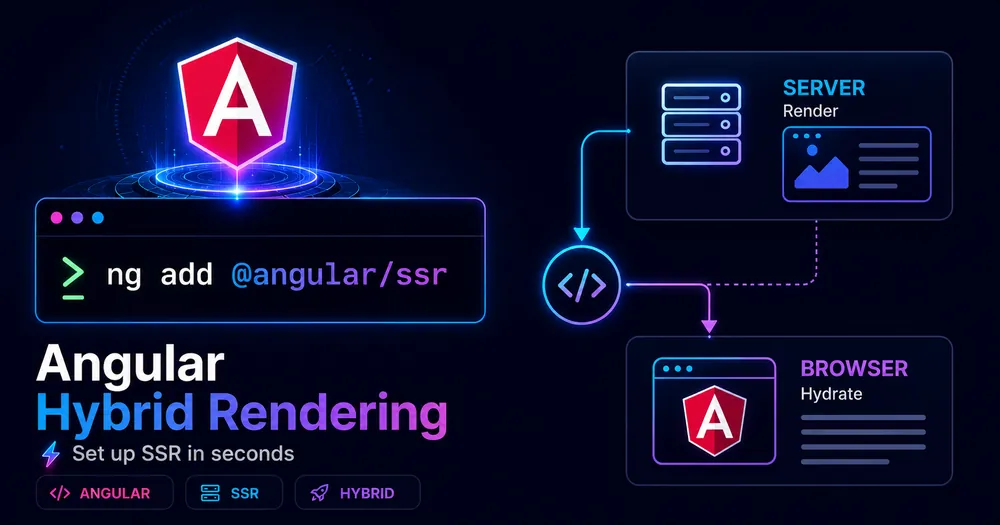
That’s client-side rendering, Angular’s default. Hybrid rendering fixes it — and since the @angular/ssr package landed, setting it up is mostly one command plus a config file you actually understand. The friction isn’t the install. It’s the half-dozen things that break right after, because your code suddenly runs somewhere that has no window.
This walks through the whole setup on Angular 21: the CLI command, what it generates, how to wire server routes, how to run it, and the errors you’ll hit on the way. By the last step you’ll have a build that ships real HTML.
Table of Contents
- Prerequisites
- Step 1 — Add SSR With One CLI Command
- Step 2 — Understand What the CLI Just Generated
- Step 3 — Configure Your Server Routes
- Step 4 — Confirm Hydration Is Enabled
- Step 5 — Run It in Dev and Build for Production
- Step 6 — Optional: Ship a Fully Static Site
- Common Errors and How to Fix Them
- Complete Code Example
- How Do You Verify SSR Is Actually Working?
- Next Steps
- Conclusion
- FAQ
Prerequisites
Before you start, have these in place:
- Node.js 20.19+ or 22.12+. Angular 21 dropped older Node versions. Check with
node -v(I’m on 22.14 locally, for reference). - Angular CLI 21. Run
ng versionto confirm. If you’re behind,npm install -g @angular/cli@latest. - A standalone-bootstrapped app. The modern
@angular/ssrflow assumes standalone APIs (bootstrapApplication,app.config.ts). NgModule apps still work but follow a slightly different server entry point. - A clean git state. The setup command edits several files. You’ll want a clean diff to review.
💡 Tip: Setting up a brand-new project? Skip Step 1 entirely and scaffold with rendering already wired in:
ng new my-app --ssr.
Step 1 — Add SSR With One CLI Command
For an existing project, the schematic does everything:
ng add @angular/ssrCode language: Bash (bash)That single command installs @angular/ssr, adds Express, scaffolds a server entry point, creates the server-side config files, and rewrites the relevant parts of angular.json. Accept the prompts and let it finish.
When it’s done, you’ll see new and modified files in your diff. Don’t skip reading them — the next step is understanding what each one does, because that’s where most “why is this broken” questions actually get answered.
FREE DOWNLOAD
🎁 Angular SSR Cheat Sheet
Render modes, hydration setup, transfer cache fixes, and common errors — all on one page. Copy-paste ready.
Step 2 — Understand What the CLI Just Generated
Four things changed. Here’s what each is for.
angular.json — the build is now SSR-aware. The schematic switches your build to the application builder and adds the server entry and output mode:
{
  "architect": {
    "build": {
      "builder": "@angular/build:application",
      "options": {
        "browser": "src/main.ts",
        "server": "src/main.server.ts",
        "outputMode": "server",
        "ssr": { "entry": "src/server.ts" }
      }
    }
  }
}Code language: JSON / JSON with Comments (json)
outputMode: "server" is the line that enables per-request rendering. ssr.entry points at the Node server file.
src/main.server.ts — the server bootstrap. It bootstraps your app with the server config. You rarely touch this.
src/app/app.config.server.ts — server-only providers. This merges with your normal app.config.ts and is where provideServerRendering lives:
// app.config.server.ts — Angular 21
import {mergeApplicationConfig, ApplicationConfig} from '@angular/core';
import {provideServerRendering, withRoutes} from '@angular/ssr';
import {appConfig} from './app.config';
import {serverRoutes} from './app.routes.server';
const serverConfig: ApplicationConfig = {
  providers: [provideServerRendering(withRoutes(serverRoutes))],
};
export const config = mergeApplicationConfig(appConfig, serverConfig);Code language: TypeScript (typescript)
src/server.ts — the Node server. This is the Express server that hands requests to Angular. The generated file looks close to this:
// server.ts — Angular 21 (@angular/ssr/node)
import {
  AngularNodeAppEngine,
  createNodeRequestHandler,
  isMainModule,
  writeResponseToNodeResponse,
} from '@angular/ssr/node';
import express from 'express';
import {join} from 'node:path';
const browserDistFolder = join(import.meta.dirname, '../browser');
const app = express();
const angularApp = new AngularNodeAppEngine();
// Serve static browser assets first (JS, CSS, images)
app.use(
  express.static(browserDistFolder, {
    maxAge: '1y',
    index: false,
    redirect: false,
  }),
);
// Everything else goes to the Angular engine
app.use((req, res, next) => {
  angularApp
    .handle(req)
    .then((response) =>
      response ? writeResponseToNodeResponse(response, res) : next(),
    )
    .catch(next);
});
// Start the server only when run directly (not when imported by the CLI)
if (isMainModule(import.meta.url)) {
  const port = process.env['PORT'] || 4000;
  app.listen(port, () => {
    console.log(`Node Express server listening on http://localhost:${port}`);
  });
}
// Exposes the handler used by the Angular CLI dev-server and during build
export const reqHandler = createNodeRequestHandler(app);Code language: TypeScript (typescript)
Two details worth internalizing. The isMainModule(import.meta.url) guard means the listener only starts when you run the file directly — during ng serve, the CLI imports reqHandler instead and manages the server itself. And static assets are served before the Angular handler, so a request for main.js never triggers a render.
⚠️ Note: The exact
server.tscontents shift slightly between Angular versions. If your generated file differs from the above, trust your generated file — the shape and the imports are what matter.
Step 3 — Configure Your Server Routes
By default Angular prerenders the whole app. To control rendering per route, edit app.routes.server.ts and assign a RenderMode to each path:
// app.routes.server.ts
import {RenderMode, ServerRoute} from '@angular/ssr';
export const serverRoutes: ServerRoute[] = [
  {path: '', renderMode: RenderMode.Prerender},        // static homepage
  {path: 'blog/:slug', renderMode: RenderMode.Server},  // dynamic, indexed
  {path: 'app/**', renderMode: RenderMode.Client},      // private, browser-only
  {path: '**', renderMode: RenderMode.Server},          // safe SSR fallback
];Code language: TypeScript (typescript)
Which mode goes where is its own decision, and getting it wrong is where teams waste server budget or lose rankings. I covered the full per-route framework — SSR vs SSG vs CSR — in the render modes guide. For setup purposes, the safe default is to leave the catch-all ** on RenderMode.Server and refine from there.
Step 4 — Confirm Hydration Is Enabled
Server rendering paints HTML fast, but the app is dead until Angular hydrates it — attaching event listeners and taking over without re-rendering from scratch. The ng add schematic wires this into your app.config.ts automatically:
// app.config.ts
import {provideClientHydration, withEventReplay} from '@angular/platform-browser';
export const appConfig: ApplicationConfig = {
  providers: [
    provideClientHydration(withEventReplay()),
    // ...your other providers
  ],
};Code language: TypeScript (typescript)
Open app.config.ts and check it’s there. If provideClientHydration() is missing, Angular throws away the server HTML and re-renders everything on the client — you’ll see a visible flash of content disappearing and reappearing. withEventReplay() is a bonus: it captures clicks and other events that happen during hydration and replays them once the app is live, so an impatient user’s first tap isn’t lost.
Step 5 — Run It in Dev and Build for Production
In development, nothing special — ng serve runs SSR for you. The dev server uses the reqHandler export, so what you see locally matches production rendering:
ng serveCode language: Bash (bash)For production, build and then run the generated server bundle:
ng build
node dist/your-app-name/server/server.mjsCode language: Bash (bash)
The build produces two folders: dist/your-app-name/browser/ (client assets) and dist/your-app-name/server/ (the Node server, entry server.mjs). The server listens on port 4000 by default; override it with the PORT environment variable:
PORT=8080 node dist/your-app-name/server/server.mjsCode language: Bash (bash)Hit the URL, then view source. If you see your actual content in the raw HTML — not an empty <app-root></app-root> — SSR is working.
Step 6 — Optional: Ship a Fully Static Site
If your whole app can be prerendered — a docs site, a marketing site, a blog with no per-request data — you don’t need a Node server at all. Set outputMode to static in angular.json:
{
  "architect": {
    "build": {
      "options": {
        "outputMode": "static"
      }
    }
  }
}Code language: JSON / JSON with Comments (json)
Now ng build emits plain HTML files for every route and skips the server bundle entirely. Drop the output on any static host or CDN — no runtime needed. This is the cheapest, most scalable deployment there is, and it’s underused. If your app qualifies, take it.
Common Errors and How to Fix Them
The setup is easy. The fallout is where the time goes. These are the ones you’ll almost certainly meet.
ReferenceError: window is not defined (or document, navigator, localStorage) Your code touched a browser global while rendering on the server. The server has no DOM. Move that logic into afterNextRender(), which only runs in the browser, or inject the DOCUMENT token instead of reaching for document directly. This is the single most common SSR error — I unpack the fixes in detail in the hydration mismatch guide.
Hydration mismatch — NG0500 The HTML Angular rendered on the server didn’t match what the client tried to hydrate. Usual culprits: @if (isPlatformBrowser(...)) branching the template, random values or Date.now() in templates, or a third-party script mutating the DOM before hydration. Keep server and client markup identical; branch on platform inside lifecycle hooks, not templates.
A visible flash, then content reloads provideClientHydration() is missing from app.config.ts. Without it Angular discards the server HTML and rebuilds from scratch. Add it back (see Step 4).
NG0203: inject() must be called from an injection context You called inject() inside getPrerenderParams after an await. The inject() call has to run synchronously, before any asynchronous work. Grab all dependencies at the very top of the function, then do your awaits.
EADDRINUSE: address already in use :::4000 Something’s already on port 4000 (often a previous server you didn’t kill). Run on a different port with PORT=4200 node dist/your-app-name/server/server.mjs, or stop the other process.
A third-party library crashes only on the server Some libraries assume a browser at import time. Load them lazily inside afterNextRender(), or provide a no-op server implementation via a platform-specific provider so the server never touches the browser-only code path.
Complete Code Example
Here’s the minimal working setup end to end, after ng add @angular/ssr and a couple of edits:
// app.config.ts — client providers + hydration
import {ApplicationConfig} from '@angular/core';
import {provideRouter} from '@angular/router';
import {provideClientHydration, withEventReplay} from '@angular/platform-browser';
import {routes} from './app.routes';
export const appConfig: ApplicationConfig = {
  providers: [
    provideRouter(routes),
    provideClientHydration(withEventReplay()),
  ],
};Code language: TypeScript (typescript)
// app.config.server.ts — server providers
import {mergeApplicationConfig, ApplicationConfig} from '@angular/core';
import {provideServerRendering, withRoutes} from '@angular/ssr';
import {appConfig} from './app.config';
import {serverRoutes} from './app.routes.server';
const serverConfig: ApplicationConfig = {
providers: [provideServerRendering(withRoutes(serverRoutes))],
};
export const config = mergeApplicationConfig(appConfig, serverConfig);Code language: TypeScript (typescript)// app.routes.server.ts — render mode per route
import {RenderMode, ServerRoute} from '@angular/ssr';
export const serverRoutes: ServerRoute[] = [
{path: '', renderMode: RenderMode.Prerender},
{path: 'blog/:slug', renderMode: RenderMode.Server},
{path: 'app/**', renderMode: RenderMode.Client},
{path: '**', renderMode: RenderMode.Server},
];Code language: TypeScript (typescript)Build and run:
ng build && node dist/your-app-name/server/server.mjsCode language: Bash (bash)How Do You Verify SSR Is Actually Working?
Three checks, fastest to most thorough.
View source. Right-click → View Page Source (not “Inspect” — that shows the hydrated DOM). If your content is in the raw HTML, the server rendered it. If you only see <app-root></app-root>, it didn’t.
Network tab, disable JavaScript. Open DevTools, disable JS, reload. SSR/prerendered pages still show content; CSR pages go blank. This is exactly what a limited search crawler experiences.
Measure the payoff. The metric that should improve is Largest Contentful Paint. Wire the web-vitals library to a GA4 custom event through GTM and compare before/after on real users:
import {onLCP} from 'web-vitals';
onLCP(({value}) => {
  (window as any).dataLayer?.push({
    event: 'web_vitals',
    metric_name: 'LCP',
    metric_value: Math.round(value),
  });
});Code language: TypeScript (typescript)
Field data beats lab scores. A Lighthouse run on your laptop won’t tell you what a mid-range phone on 4G sees — your GA4 numbers will.
Next Steps
With the plumbing working, the next decisions are about which routes render how, and keeping your components server-safe:
- Assign render modes deliberately, route by route — SSR vs SSG vs CSR explained.
- Audit components for browser-global access and hydration mismatches — fixing Angular hydration mismatches.
- Read the official reference for the server APIs in the Angular SSR guide.
Conclusion
The setup itself is genuinely one command — ng add @angular/ssr does the heavy lifting, and the generated files are readable once you know what each is for. The real work starts after: assigning render modes per route and making your components survive an environment without a DOM.
Run the setup on a branch, get view-source showing real HTML, then audit one component at a time for window access. Do that and you’ve turned a blank-screen-then-boot app into one that ships content on the first byte.
FAQ
What does ng add @angular/ssr actually do? It installs the @angular/ssr package and Express, scaffolds a Node server entry (server.ts), creates app.config.server.ts and app.routes.server.ts, adds provideClientHydration() to your client config, and updates angular.json to use the application builder with outputMode: "server".
How do I run an Angular SSR app in production? Build with ng build, which generates dist/your-app/browser/ and dist/your-app/server/. Then start the Node server with node dist/your-app/server/server.mjs. Set the PORT environment variable to change the default port of 4000.
Do I need a Node server for Angular hybrid rendering? Only if you use per-request SSR. If every route can be prerendered at build time, set outputMode: "static" in angular.json and deploy the static output to any CDN — no Node runtime required.
Why does my Angular app throw “window is not defined” after adding SSR? Because that code now runs on the server, which has no browser globals. Move browser-only logic into afterNextRender() or use the DOCUMENT injection token instead of referencing document or window directly.
Does hybrid rendering work with Angular standalone components? Yes. The @angular/ssr flow is built around standalone APIs and bootstrapApplication. NgModule-based apps are still supported but use a different server bootstrap entry point.
📚 READ NEXT
→ How to Stop Duplicate API Calls in Angular SSR — the transfer cache fix
→ Angular Render Modes: SSR, SSG, or CSR? — how to pick per route