
Time to Interactive is the metric that lies. Your Lighthouse score looks great, the page paints fast — but click anything in the first three seconds and nothing happens. The JavaScript hasn’t executed yet. The component is there, but it isn’t awake.
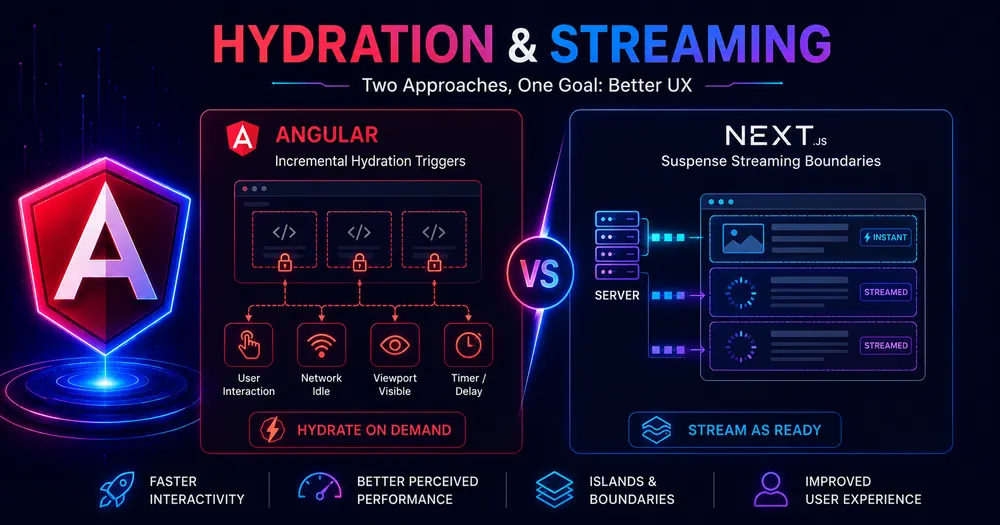
Both Angular and Next.js have answers for this. Angular’s @defer block with incremental hydration lets you ship full server-rendered HTML and delay waking up specific component subtrees until the user actually needs them. Next.js uses React Suspense and streaming to progressively send server components from the server, starting with what’s ready and flowing in the rest.
They’re solving adjacent problems at different layers of the stack. Confusing them — or assuming one is a direct port of the other — leads to architectures that don’t perform the way you expect. Here’s exactly how each works, where they overlap, and what each can do that the other can’t.
Table of Contents
- The Problem Both Are Solving
- Angular @defer and Incremental Hydration
- Next.js Suspense and SSR Streaming
- Next.js 16: Suspense as a Cache Boundary With PPR
- How They Actually Differ: 4 Concrete Distinctions
- What Can Each Do That the Other Cannot?
- Conclusion
- FAQ
The Problem Both Are Solving
Server-side rendering solves the blank-screen problem — the user sees real HTML immediately. But it trades one problem for another: the page looks interactive before it is. Angular’s runtime, all your component code, all your dependencies have to download, parse, and execute before any event handler fires. On a mid-range mobile device on a 4G connection, that window between “visible” and “interactive” can be several seconds long.
The naive solution — send less JavaScript — breaks interactivity. The smart solution is to be selective: identify the parts of the page that don’t need to be immediately interactive, delay loading or executing their JavaScript, and front-load only what the user will actually touch in the first second.
Angular and React arrived at different architectural answers. Angular stays fully in the browser: the server renders the full HTML, ships it, and the client decides when to execute each piece. React (via Next.js) moves the decision earlier: some components never send JavaScript at all, and others stream in progressively from the server as data resolves.
Angular @defer and Incremental Hydration
@defer has existed since Angular 17 as a way to lazily load component bundles — the component’s JavaScript downloads only when a trigger fires. Incremental hydration, stable since Angular 20 and solidified in v21, extends this further: @defer blocks can now be rendered on the server as real HTML (not a placeholder), and the browser delays executing that JavaScript until a trigger fires.
Enable it once in your app config, replacing withEventReplay() which is now included automatically:
// app.config.ts — Angular 21
import {provideClientHydration, withIncrementalHydration} from '@angular/platform-browser';
export const appConfig: ApplicationConfig = {
  providers: [
    provideClientHydration(withIncrementalHydration()),
    // withEventReplay() no longer needed — included automatically
  ],
};Code language: TypeScript (typescript)
Then use hydrate triggers in templates. These control when Angular downloads and executes the component’s JavaScript after the server-rendered HTML has arrived:
<!-- reviews.component.html — Angular 21 incremental hydration -->
<!-- Hydrates when the component scrolls into view -->
@defer (hydrate on viewport) {
  <app-reviews [productId]="productId" />
}
<!-- Hydrates only when the user clicks or touches it -->
@defer (hydrate on interaction) {
  <app-live-chat />
} @placeholder {
  <button class="chat-trigger">Chat with us</button>
}
<!-- Hydrates when the browser CPU is idle -->
@defer (hydrate on idle) {
  <app-recommendations />
}
<!-- Never hydrates — permanently static HTML, zero JS for this subtree -->
@defer (hydrate never) {
  <app-legal-footer />
}Code language: HTML, XML (xml)
The critical difference between hydrate triggers and regular @defer loading triggers: loading triggers (on viewport, on idle) control when the bundle downloads. Hydration triggers control when already-downloaded JavaScript executes and wires up the component. With incremental hydration, the server renders the main template — not a placeholder — so the user sees real content immediately with no layout shift. The JavaScript is just dormant until the trigger fires.
Angular captures events (clicks, keypresses) during the dehydrated window using jsaction attributes embedded in the server HTML, and replays them once hydration completes — so a user who clicks a dehydrated button before its JavaScript loads doesn’t lose that interaction.
💡 Tip:
hydrate neveris Angular’s most aggressive option — that subtree stays as permanent static HTML. Zero JavaScript ever executes for it. This is the right choice for content-only sections like footers, legal copy, or informational sidebars that have no event handlers.
Next.js Suspense and SSR Streaming
React Suspense in Next.js works at the server level, not the hydration level. When a Server Component is wrapped in <Suspense>, Next.js doesn’t wait for it to finish before sending the response — it immediately sends the static fallback, then streams the resolved content into the page as it becomes ready on the server:
// app/product/[id]/page.tsx — Next.js 16
import {Suspense} from 'react';
import {Reviews} from './reviews';
import {Recommendations} from './recommendations';
export default async function ProductPage({params}: {params: {slug: string}}) {
  // This data fetches immediately — no Suspense
  const product = await getProduct(params.id);
  return (
    <main>
      <h1>{product.name}</h1>
      {/* Streams in when reviews data resolves on the server */}
      <Suspense fallback={<ReviewsSkeleton />}>
        <Reviews productId={params.id} />
      </Suspense>
      {/* Streams in independently, doesn't block reviews */}
      <Suspense fallback={<RecommendationsSkeleton />}>
        <Recommendations productId={params.id} />
      </Suspense>
    </main>
  );
}Code language: TypeScript (typescript)
Reviews and recommendations fetch in parallel on the server. The browser receives the product name instantly. Each section streams in as its server data resolves — whichever finishes first appears first, without blocking the others.
For Client Components (those with 'use client'), Suspense can also wrap React.lazy() for code-splitting and deferred hydration. The Client Component’s JavaScript loads lazily, and the Suspense boundary shows its fallback until the bundle is ready. This is the closest Next.js gets to Angular’s trigger-based deferral — but the trigger is always “bundle loaded,” not “user scrolled” or “user clicked.”
Next.js also provides loading.tsx as a file-based shortcut that automatically wraps a route’s page in a Suspense boundary, so the skeleton shows while data loads:
// app/product/[id]/loading.tsx — automatic Suspense boundary
export default function Loading() {
  return (
    <div className="skeleton-card">
      <div className="skeleton-title" />
      <div className="skeleton-body" />
    </div>
  );
}Code language: TypeScript (typescript)
Next.js 16: Suspense as a Cache Boundary With PPR
Next.js 16’s Cache Components feature promotes Suspense from a loading boundary into a rendering mode boundary. With cacheComponents: true in your config, the content outside a Suspense boundary becomes fully static — prerendered and cached at the CDN edge. The content inside a Suspense boundary is the dynamic portion, streamed from the origin server per request:
// next.config.ts — Next.js 16 PPR
import type {NextConfig} from 'next';
const nextConfig: NextConfig = {cacheComponents: true};
export default nextConfig;
// app/product/[id]/page.tsx — static shell + dynamic stream
export default async function ProductPage({params}: {params: {slug: string}}) {
  const product = await getProduct(params.id); // cached statically
  return (
    <main>
      {/* Served instantly from CDN */}
      <StaticProductLayout product={product} />
      {/* Streamed from origin per request (user-specific) */}
      <Suspense fallback={<PriceSkeleton />}>
        <PersonalizedPrice userId={userId} productId={params.id} />
      </Suspense>
    </main>
  );
}Code language: TypeScript (typescript)
The static shell serves at CDN speed — under 100ms — while the personalized sections stream in from the origin. One HTTP response; two rendering modes; no client-side fetch for either.
This is where Next.js is architecturally ahead. Angular has no server-streaming equivalent — @defer and incremental hydration operate entirely in the browser after the full HTML has landed.
How They Actually Differ: 4 Concrete Distinctions
1. Server vs Browser — Where the Deferral Happens
Angular’s deferral happens in the browser. The server renders full HTML; the browser holds JavaScript dormant until a trigger fires. Next.js Suspense’s deferral happens on the server — the server streams HTML progressively, and the browser may receive content at different times. One is a hydration-time mechanism; the other is a response-time mechanism.
2. Trigger Model
Angular has a rich declarative trigger system: hydrate on viewport, hydrate on idle, hydrate on interaction, hydrate on timer(2000), hydrate when (condition), hydrate never. You can be surgical about which user behavior unlocks each component.
Next.js has no trigger concept for server streaming — Suspense resolves when the async operation completes. For Client Component lazy loading, the trigger is always “bundle is ready.” There’s no equivalent of “hydrate only when the user scrolls to it” for server-rendered content.
3. JavaScript Sent to the Client
Angular’s incremental hydration delays execution of JavaScript, not the sending of it. The component’s JS bundle is still in the graph — it just doesn’t run until the trigger fires. React Server Components (Server Components in Next.js) send no JavaScript to the client at all. A Server Component wrapped in Suspense streams its HTML and that’s it — no runtime cost in the browser whatsoever.
For content-heavy subtrees where zero interactivity is needed, Next.js RSC produces smaller bundles. Angular’s hydrate never is the closest equivalent — permanently static HTML, no JS executed — but the bundle may still appear in the dependency graph depending on how it’s structured.
4. What the User Sees While Waiting
With Angular incremental hydration (and withIncrementalHydration() enabled), the user sees the fully rendered main template immediately. The component looks complete; it just doesn’t respond to events yet. With Next.js Suspense, the user sees the fallback while the server resolves the component. The difference: Angular’s approach feels more stable (no skeleton-to-content swap); Next.js Suspense can show accurate skeletons while genuinely unknown data loads.
What Can Each Do That the Other Cannot?
Angular does, Next.js doesn’t:
- Trigger-based hydration —
hydrate on viewport,hydrate on idle,hydrate on interaction. There’s nothing in Next.js that delays hydrating a server-rendered component until the user scrolls to it. hydrate never— a component subtree that is permanently static, never executing JavaScript, with no bundle penalty for having existed in the template. Useful for footer content, legal copy, or informational sections with guaranteed no interactivity.
Next.js does, Angular doesn’t:
- Server-side streaming — content that the user has never seen begins rendering on the server while the rest of the response is in flight. The browser starts parsing real content while data is still resolving. Angular delivers the complete HTML before the browser sees anything.
- PPR via Cache Components — static shell served from CDN, dynamic portions streamed from the origin, all in one HTTP response. Angular has no server-side rendering granularity below the route level.
- Zero-JS Server Components — components that render on the server and send no JavaScript to the browser at all, not just deferred JavaScript. Angular always ships the component’s JS eventually (except
hydrate never, which keeps it dormant).
For a deeper look at how these two frameworks compare across rendering and deployment more broadly, the Angular SSR vs Next.js and route rendering comparison articles cover the wider picture.
Conclusion
Angular’s incremental hydration and Next.js Suspense are genuinely complementary ideas, not competing implementations of the same thing. Angular optimises the browser side of the equation — keeping full server-rendered HTML while delaying JS execution with surgical, trigger-based control. Next.js optimises the server side — streaming content progressively, eliminating JavaScript for non-interactive components entirely, and mixing cached and dynamic rendering within a single response.
If your primary concern is Time to Interactive on a complex, interactive Angular app, incremental hydration’s hydrate on viewport and hydrate on idle triggers give you fine-grained control with no architectural change. If you’re building a content-heavy app and the JavaScript bundle itself is the problem, Next.js RSC and PPR address it at the source. Neither framework has fully closed the gap with the other — which is the honest reason both are worth understanding in 2026.
FAQ
What is Angular incremental hydration? Incremental hydration is an Angular feature (stable since v20, solidified in v21) that uses @defer blocks with hydrate triggers to delay executing a component’s JavaScript until the user needs it — on viewport, on interaction, on idle, or never. The server still renders the full HTML; the JS just stays dormant until the trigger fires. Enable it with provideClientHydration(withIncrementalHydration()).
What is the Angular equivalent of React Suspense? There’s no exact Angular equivalent. For client-side deferred loading, @defer is the closest match — it lazily loads component bundles on a trigger. For incremental hydration (delaying JS execution after SSR), @defer with hydrate triggers is the closest. Angular has no server-side streaming equivalent of Suspense — the server always sends the complete HTML before the browser receives anything.
Does Next.js Suspense work with server-side rendering? Yes. In the App Router, Server Components wrapped in <Suspense> stream their HTML from the server progressively — the browser receives the fallback immediately, then the resolved content streams in as the server finishes data fetching. With Next.js 16 PPR (Cache Components), the static Suspense shell is cached at the CDN edge.
What is hydrate never in Angular? @defer (hydrate never) marks a component subtree as permanently static HTML. Angular renders it on the server but never loads or executes its JavaScript in the browser. It’s the most aggressive deferral option and is appropriate for content-only sections (footers, legal text, informational sidebars) that have no event handlers or interactive behavior.
Can Angular @defer and Next.js Suspense be used together? No — they’re features of their respective frameworks. Angular @defer is an Angular template construct; Suspense is a React/Next.js mechanism. If you’re comparing which to use, the choice comes down to which framework you’re in. If you’re evaluating which framework to adopt, the Angular SSR vs Next.js comparison covers the broader architectural tradeoffs.
📚 READ NEXT
→ Angular SSR vs Next.js: How to Choose in 2026 — full framework comparison
→ Angular Render Modes: SSR, SSG, or CSR? — how to pick per route