
<Link> Isn’t Enough: How Next.js Prefetching Really Works (and Where It Silently Fails)
You added <Link> everywhere. Prefetching is automatic — the docs say so, every tutorial says so. And yet navigating to your blog post page still feels like the app froze.
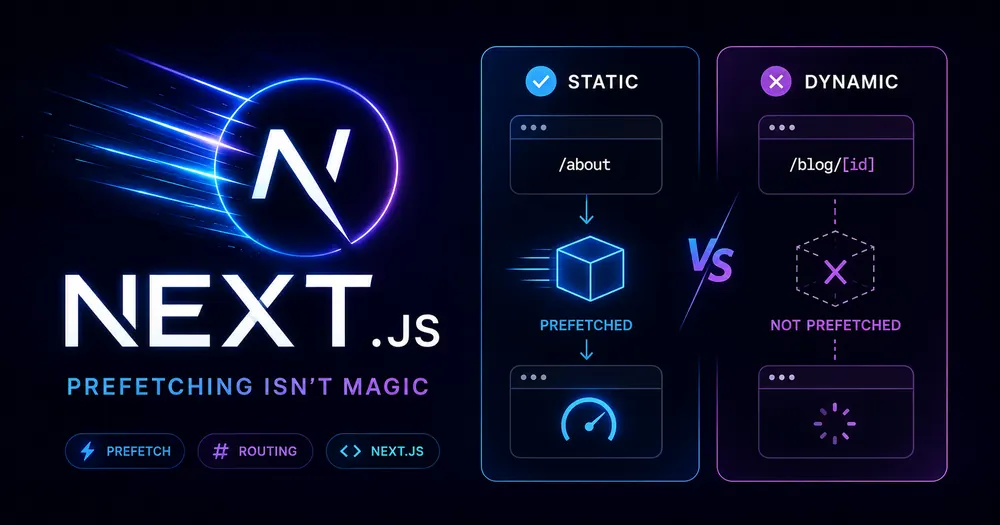
The problem isn’t your code. It’s that Next.js prefetching has a hard split between static and dynamic routes that almost no tutorial explains — and dynamic routes, the kind you actually use for real content, get almost nothing by default.
Here’s what’s actually happening under the hood, and where to intervene.
Table of Contents
- How Next.js Navigation Works (The Real Model)
- What Prefetching Actually Does
- The Static vs Dynamic Split — Why Your Route Gets Skipped
- The Hydration Problem Nobody Mentions
- How to Fix Prefetching for Dynamic Routes
- When to Disable Prefetching (and How to Do It Safely)
- Measuring the Difference
- Summary
- FAQ
How Next.js Navigation Works (The Real Model)
Before touching prefetching specifically, you need the full picture of what happens when a user navigates between routes in the App Router.
There are three systems working in parallel:
Server Rendering — Layouts and pages are React Server Components by default. On every navigation, the Server Component Payload gets generated on the server and sent to the client. The client waits for that response before it can show the new route. This is the source of the slowness.
Prefetching — Next.js tries to load that server response before the user clicks, so by the time they do, the data is already there. <Link> components in the viewport trigger this automatically.
Client-side Transitions — Instead of reloading the page, Next.js swaps content dynamically, keeping shared layouts alive and preserving state. This is what makes SSR apps feel like SPAs.
All three work together. But if prefetching doesn’t run — or runs partially — the client-side transition still has to wait for the server. That’s when navigation feels frozen.
What Prefetching Actually Does
When a <Link> component enters the viewport (or is hovered), Next.js fires a background request to load the route. By the time the user clicks, the response is cached client-side and the transition happens instantly.
The <a> vs <Link> distinction matters more than most developers realize. Native anchor tags bypass the entire prefetching system. If you’re mixing them — say, for external links or legacy components — those routes will always cold-load.
But here’s the catch that the docs bury in a footnote.
The Static vs Dynamic Split — Why Your Route Gets Skipped
This is the part that most articles skip entirely.
How much of the route gets prefetched depends entirely on whether the route is static or dynamic:
| Route type | Prefetch behavior |
|---|---|
| Static (prerendered at build time) | Full route prefetched — layout + page content |
| Dynamic (rendered at request time) | Skipped entirely, OR partially prefetched if loading.tsx exists |
So: /about (static) gets fully prefetched. /blog/[slug] (dynamic) gets nothing, unless you’ve added a loading.tsx file.
Why does Next.js skip dynamic routes? Because prefetching a dynamic route would mean hitting the server speculatively for every link in the viewport — for every user — before they’ve even clicked anything. That’s potentially thousands of unnecessary server renders for routes people may never visit. Skipping them is the correct default.
The tradeoff is that navigation to dynamic routes can feel slow, because the client has to wait for a fresh server response on every click.
⚠️ Note: In development mode, Next.js Devtools will show whether a route is static or dynamic via the
devIndicatorsconfig. Use it. Don’t guess.
The Hydration Problem Nobody Mentions
There’s a second failure mode that’s separate from the static/dynamic split, and it hits on initial page load specifically.
<Link> is a Client Component. That means it needs to be hydrated before it can start prefetching anything. On the initial visit, if your JavaScript bundle is large, hydration takes time — and prefetching doesn’t start until hydration completes.
The practical result: a user lands on your homepage, the page looks ready, and then immediately clicks a link before React has finished hydrating. The <Link> component isn’t active yet. No prefetch has run. The navigation cold-loads.
React addresses this with Selective Hydration (prioritizing interactive components near the viewport), but you can help by:
- Auditing bundle size with
@next/bundle-analyzerand removing large client-side dependencies - Moving logic server-side wherever possible — fewer Client Components means a smaller hydration surface
I’ve seen this bite particularly hard on dashboards with complex nav bars loaded as 'use client' unnecessarily. The nav hydrates last, prefetching starts late, and the first few link clicks are always slow.
How to Fix Prefetching for Dynamic Routes
You have two options. They solve different problems and are often used together.
Option 1: Add loading.tsx to Enable Partial Prefetching
This is the most important thing you can do for dynamic routes, and it’s frequently missing from production apps.
When loading.tsx exists in a route folder, Next.js can partially prefetch the route — specifically the shared layout and the loading skeleton. The actual page content still renders server-side on click, but the skeleton appears instantly, eliminating the perception of freezing.
Behind the scenes, Next.js wraps your page.tsx in a <Suspense> boundary automatically. The prefetched skeleton becomes the fallback — it shows immediately on click — and gets swapped for real content once the server responds.
The improvements are measurable across three Core Web Vitals:
- TTFB — unchanged (server still renders), but perceived TTFB drops to zero
- FCP — skeleton renders immediately instead of blank screen
- TTI — shared layouts stay interactive during the transition
💡 Tip: Design your skeleton to match the real layout dimensions. Layout shift during the swap tanks your CLS score. Match heights as closely as possible.
Option 2: Use generateStaticParams to Prerender the Route
If the route’s content is known at build time — blog posts, product pages, documentation — you should be statically prerendering it, not relying on dynamic rendering at all.
The fix is generateStaticParams. Without it, even a route that could be static will fall back to dynamic rendering at request time.
Once this is in place, /blog/[slug] becomes a static route. Full prefetching kicks in. Navigation becomes instant — no server round-trip, no loading state needed.
Honestly, generateStaticParams should be the first thing mentioned in every dynamic route tutorial. It almost never is. If your content doesn’t change per-request (most blog posts, most product pages), this is the correct solution, not loading.tsx.
Use both together for the best outcome: generateStaticParams for known slugs, loading.tsx as a fallback for slugs generated after build (ISR, on-demand revalidation).
When to Disable Prefetching (and How to Do It Safely)
Prefetching costs bandwidth and server compute. For most routes it’s worth it. But there are cases where you should opt out.
Infinite scroll tables. If you’re rendering 200 rows each containing a <Link>, Next.js will attempt to prefetch 200 routes when the table mounts. That’s almost certainly not what you want.
The tradeoff is real: static routes will cold-load on click, dynamic routes need a full server render. You’re trading perceived performance for resource usage.
A middle path: prefetch only on hover. This limits prefetching to routes the user signals intent for, rather than everything in the viewport.
// app/ui/hover-prefetch-link.tsx ‘use client’ import Link from ‘next/link’ import { useState } from ‘react’ function HoverPrefetchLink({ href, children, }: { href: string children: React.ReactNode }) { const [active, setActive] = useState(false) return ( setActive(true)} > {children} ) }This pattern works well for data tables, sidebars with many items, and search results. It’s worth noting I haven’t benchmarked this against every viewport/scroll combination — if your list is extremely dynamic, validate the behavior manually.
Measuring the Difference
Don’t ship prefetching changes without measuring them. Two places to check:
Chrome DevTools Network tab — Filter by Fetch/XHR and look for RSC payload requests (they contain ?_rsc= in the URL). You should see these firing before you click, as links enter the viewport. If you only see them after clicking, prefetching isn’t running.
Web Vitals JS library or GA4 custom events — For production monitoring, capture INP (Interaction to Next Paint) on <Link> clicks. If your dynamic routes are cold-loading, INP will be high. After adding loading.tsx, INP drops because the transition starts instantly.
Wire this up before and after your prefetching changes. The before/after delta is the clearest way to justify the work to stakeholders.
Summary
Next.js prefetching works automatically — but only for static routes. Dynamic routes, the ones powering most real content, get skipped unless you opt in explicitly.
The fix is usually one of these, in order of impact:
generateStaticParams— if the route’s slugs are known at build time, prerender them. Full prefetch kicks in automatically.loading.tsx— unlocks partial prefetching for dynamic routes. Skeleton shows instantly on click.HoverPrefetchLink— for link-heavy lists where viewport prefetching is wasteful.- Bundle size reduction — if hydration is slow, prefetching starts late. Audit with
@next/bundle-analyzer.
The key mental model shift: <Link> isn’t a prefetch guarantee. It’s a prefetch request that Next.js may honor fully, partially, or not at all depending on route type and hydration state.
FAQ
Why does prefetching work in development but not production?
The opposite is usually true — prefetching is more aggressive in production. In development, Next.js uses dynamic rendering for most routes to support hot reload. If navigation feels fast in dev but slow in production, the issue is likely missing loading.tsx or generateStaticParams for dynamic routes.
Does prefetching work with dynamic search params (e.g., /search?q=...)?
Not automatically. Prefetching is path-based. Query params that change per-request won’t be prefetched. The useLinkStatus hook is the right tool for showing feedback during these navigations.
What’s the difference between prefetch={false} and prefetch={null}?
null is the default behavior — prefetch based on route type. false disables prefetching entirely. There’s no true option that forces prefetching of dynamic routes.
Will generateStaticParams cause stale content?
Yes, if your content changes after build. Use revalidate (ISR) to control how often static pages regenerate. For content that changes frequently, stick with dynamic rendering + loading.tsx.
Does prefetching happen on mobile?
Viewport-based prefetching works on mobile too. Hover-based prefetching doesn’t (no hover events). On slow mobile networks, prefetches may not complete before a user clicks — that’s where useLinkStatus becomes important for showing a manual loading indicator.